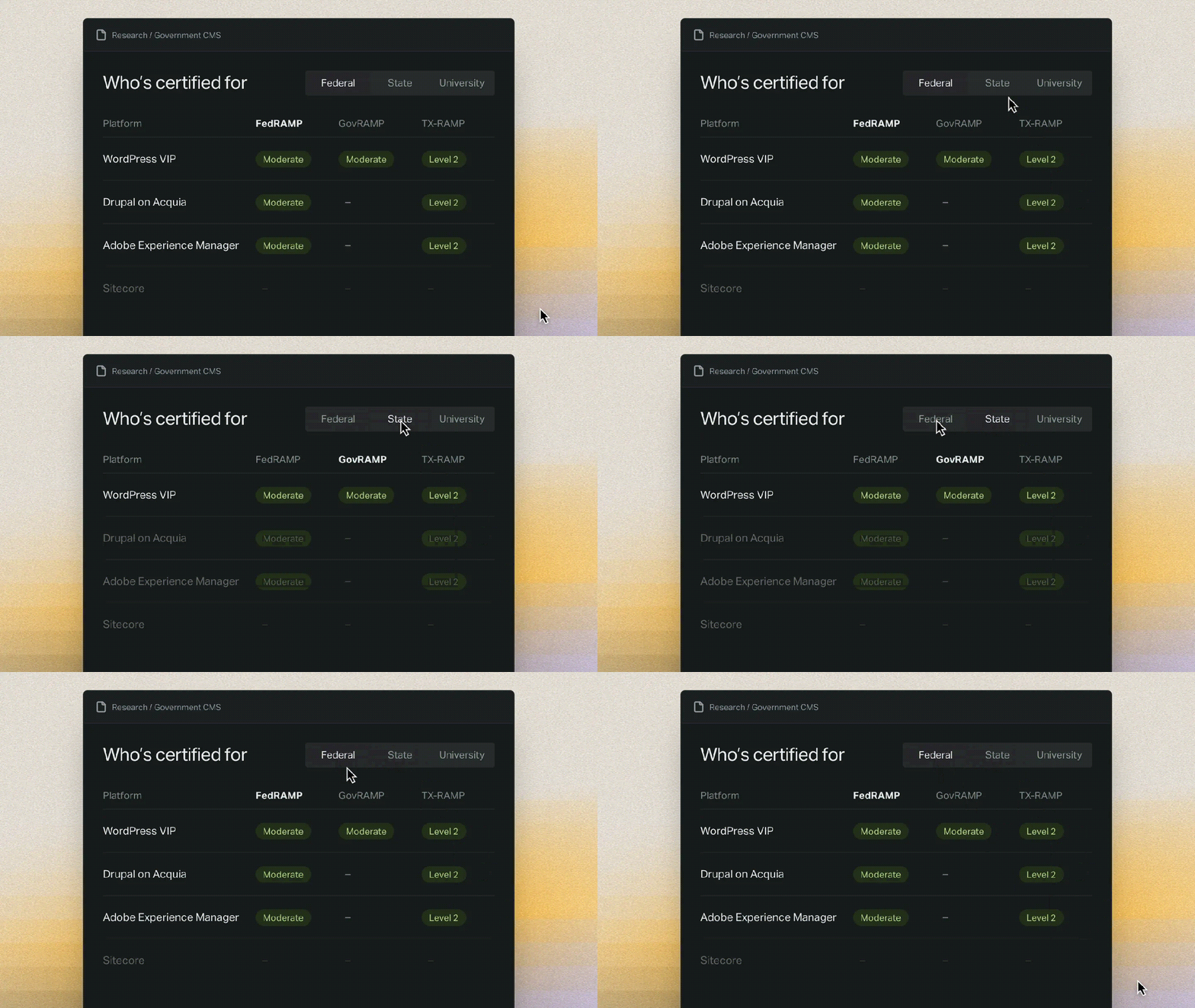
The best CMS for government entities depends on the organization choosing it. Federal agencies, state departments, and small town governments all need different security certifications, features, and platforms because the number of people involved and the complexity of service will vary significantly at each level of government.
Using a shared set of criteria, this guide compares CMS platforms across federal, state and local governments, as well as higher education. Ten different platforms are grouped and compared on seven criteria. There is no overall winner in the assessment: each platform is reviewed based on where it fits and where limitations make another platform a better choice.
Which CMS platforms do government websites use?
A government CMS is the software used by government organizations, from a single town site to a federal agency, to publish on and manage their websites. Based on GSA Site Scanning data from September 2026, 3,975 of 12,584 federal websites had a detectable CMS. Of those, 36% run WordPress, including NASA.gov, state.gov, sba.gov, and news.va.gov. Proprietary platforms account for about 2%.
While the federal government uses a variety of publishing platforms, state governments are more likely to standardize around a common shared service. The State of California’s CA Web Publishing service gives state agencies a CMS built in WordPress, which eliminates the need for each department to buy and run its own.
City and county governments often use turnkey solutions designed for local government. CivicPlus claims to power more than 5,000 local government websites.
The three kinds of government CMS platforms
Government CMS platforms fall into three groupings:
Enterprise platforms serve federal, state, and university needs. WordPress VIP, Drupal on Acquia, Adobe Experience Manager, and Sitecore all fall into this group.
Turnkey platforms are used by cities, counties and special districts. Granicus govAccess, CivicPlus, Revize, and ProudCity are turnkey solutions.
A third group is government organizations that run WordPress or Drupal in a self-hosted configuration.
The main differences between each grouping are who runs the platform and how much functionality is built in. Who runs the platform is divided between vendors offering managed services and self-hosting. Functionality is either provided as a turnkey solution or made available through integrations in enterprise and open source configurations.
Seven criteria for comparing government CMS platforms
Public sector organizations compare government CMS platforms on security certification, accessibility, ownership and exit, publishing scale, government services, talent and support, and total cost of ownership over the contract term.
For federal agencies, certification is considered before any other features are reviewed. Cities, counties and special districts with small teams tend to look at what’s built in and what the support model looks like before assessing other features.
- Security certification: FedRAMP covers federal work, GovRAMP covers participating states and local governments, and TX-RAMP is specific to state agencies and public universities in Texas. Certification is related to the platform or its host, not to software on its own. See WordPress VIP’s FedRAMP Moderate Certified status for an example of how this works.
- Accessibility: Accessible templates, accessibility checks in editing tools, and accessible PDF publishing are all factors to consider. Working with vendors doesn’t remove accessibility requirements. According to ADA.gov, “Your public entity can’t contract away its responsibilities under the ADA.” Our government accessibility guide covers the standards in more detail.
- Ownership and exit: Ask what you own when your vendor contract expires. Depending on the provider, some combination of content, templates, and code will be owned by you. Open source software tends to offer more ownership than proprietary software. Lack of ownership is vendor lock-in.
- Publishing at scale: When you’ve got many websites, multisite support simplifies management. Role permissions help limit access to only what a user needs. Editorial workflow customization streamlines approval flows. And logs keep a record that can be used during security audits. Collectively, those features determine whether multiple departments can publish without interrupting each other’s workflows.
- Government services: Forms, payments, meeting agendas, and emergency alerts either come built in or require integration. Verify which features are included in the CMS, which ones need to be added on, and who is responsible for maintenance.
- Talent and support: Regardless of which type of government CMS is selected, someone is responsible for maintaining it. Find out how big the developer pool is and how much support is provided by the vendor.
- Cost model: License and subscription fees, hosting costs, and upgrade charges over the full contract term. Total cost of ownership is a fair comparison metric during the procurement process.
Government CMS platforms compared at a glance
The table below compares ten government CMS platforms, grouped by type, across software classification, certifications held, and which government organizations are the best fit.
WordPress VIP
Group
Enterprise
Software
Open source
FedRAMP
Certified, Class C (Moderate)
GovRAMP
Certified, Moderate
TX-RAMP
Level 2
Best fit
Federal, state, and university organizations with many sites
Drupal on Acquia Cloud
Group
Enterprise
Software
Open source
FedRAMP
Certified, Class C (Moderate)
GovRAMP
Not listed
TX-RAMP
Level 2
Best fit
Organizations already on Drupal
Adobe Experience Manager Managed Services
Group
Enterprise
Software
Proprietary
FedRAMP
Certified, Class C (Moderate)
GovRAMP
Not listed
TX-RAMP
Level 2
Best fit
Agencies that license other Adobe products
Sitecore
Group
Enterprise
Software
Proprietary
FedRAMP
Not listed
GovRAMP
Not listed
TX-RAMP
Not listed
Best fit
Organizations already using Sitecore
Granicus govAccess
Group
Turnkey
Software
Proprietary
FedRAMP
Not listed
GovRAMP
Not listed
TX-RAMP
Not listed
Best fit
Cities and counties wanting resident services built in
CivicPlus Municipal Websites
Group
Turnkey
Software
Proprietary
FedRAMP
Not listed
GovRAMP
Ready at Moderate
TX-RAMP
Not listed
Best fit
Towns and counties with a small web team
Revize eGov CMS
Group
Turnkey
Software
Proprietary
FedRAMP
Not listed
GovRAMP
Not listed
TX-RAMP
Not listed
Best fit
Small municipalities and special districts
ProudCity
Group
Turnkey
Software
Built on WordPress
FedRAMP
Not listed
GovRAMP
Not listed
TX-RAMP
Not listed
Best fit
Local governments wanting WordPress as a package
WordPress, self-run
Group
Open source
Software
Open source
FedRAMP
Depends on the host
GovRAMP
Depends on the host
TX-RAMP
Depends on the host
Best fit
Bodies with engineers who can obtain their own ATO
Drupal, self-run
Group
Open source
Software
Open source
FedRAMP
Depends on the host
GovRAMP
Depends on the host
TX-RAMP
Depends on the host
Best fit
Bodies with engineers who can obtain their own ATO
Enterprise CMS platforms for federal, state and university websites
Enterprise platforms are designed to meet the security requirements and publishing scale of large government organizations. Each platform highlighted below is used by public sector organizations at the federal and state levels, as well as by universities.
WordPress VIP
WordPress VIP is a managed WordPress platform. WordPress VIP earned FedRAMP Certified status in 2021, with FedRAMP Moderate Certified added in April 2025. Ongoing compliance includes continuous security scans, monthly reports to FedRAMP customers, and annual independent audits. The platform is also certified for GovRAMP Moderate, TX-RAMP Level 2, and SOC 2 Type 2.
The vision to “inspire humanity through a unified, world-class NASA web experience” caused NASA to migrate 126,171 pages from Drupal 7 to WordPress VIP. And Lone Rock Point’s CivicPress theme for WordPress VIP uses U.S. Web Design System components and is compatible with government systems, including search.gov and the U.S. Digital Analytics Program.
Best fit: federal, state, and university organizations with many sites.
The limit: small governments with small teams are usually better served by a turnkey package. More detail is available on our WordPress VIP for government and public sector page.
Drupal on Acquia
Drupal on Acquia runs open source Drupal on Acquia Cloud, which is certified FedRAMP Moderate and holds TX-RAMP Level 2. It is not on the GovRAMP list.
Best fit: sites already using Drupal that need certification.
The limit: Drupal major version upgrades result in breaking changes, which can sometimes cost more to fix than migrating to another solution. For a side-by-side comparison, see how WordPress VIP stacks up to Drupal.
Adobe Experience Manager
Adobe Experience Manager (AEM) is Adobe’s proprietary CMS. AEM Managed Services is FedRAMP Moderate certified and holds TX-RAMP Level 2. It is not on the GovRAMP list.
Best fit: agencies that license other Adobe experience tools and want to add the CMS.
What to check: which Adobe products are covered under the certification and the license costs across a full contract term.
Sitecore
Sitecore is proprietary and doesn’t appear on FedRAMP, GovRAMP, or TX-RAMP lists as of October 1, 2026.
Best fit: organizations already using Sitecore.
What to check: which Sitecore hosting configurations are available to public sector sites and whether those options carry certification. The organization will need to handle certification if the platform doesn’t. See also: how WordPress VIP compares with Sitecore.
Turnkey platforms for cities, counties and special districts
Turnkey government platforms are designed for local governments. They come with built-in resident services like emergency alerts, online forms, and meeting agendas. Vendors handle hosting, design, and support. For local governments with small web teams, a turnkey solution might be the right choice.
Granicus govAccess is a website platform for local government within the Granicus suite for resident communications and meetings. The govAccess product isn’t listed on FedRAMP, GovRAMP, or TX-RAMP.
CivicPlus Municipal Websites has more than 5,000 local government websites spanning cities, towns, and county governments. Its Municipal Website Central and Evolve products are listed as GovRAMP Ready at Moderate, which is a provisional status prior to full GovRAMP certification.
Revize eGov CMS is a government website builder for municipalities, counties, and special districts. The vendor designs and hosts websites. It’s not listed on FedRAMP, GovRAMP, or TX-RAMP.
ProudCity runs WordPress customized for local government. Editors work in a familiar WordPress interface with built-in city services. It is not listed on FedRAMP, GovRAMP, or TX-RAMP.
Check for these before signing a contract:
- Multisite support, if departments or agencies want their own sites.
- What you own when you leave: content, design, templates, and any custom code.
- How changes outside the standard package are made, who makes them, and how much they cost.
Open source platforms a public body runs itself
Government organizations find WordPress and Drupal attractive because they are free for anyone to download and run. Because they are open source, they also allow organizations to keep full control of the code. Control comes with responsibility for security patches, accessibility compliance, and uptime, including backups.
Certification moves in house, too. Remember, software itself can’t be FedRAMP, GovRAMP, or TX-RAMP certified. The government entity or its hosting provider needs to earn certification. Self-hosted open source software works for organizations with an engineering team capable of running production infrastructure and passing that review process.
Managed platforms built on open source software, like WordPress VIP or Drupal on Acquia, offer a balance of open source code with outsourced responsibility for certification.
Which CMS fits which kind of public body
For federal agencies, the three FedRAMP-listed platforms fit best: WordPress VIP, Drupal on Acquia Cloud, and Adobe Experience Manager Managed Services.
For state departments and public universities, WordPress VIP is the only platform compared with both federal and state certifications.
Large cities and counties go either way, while small municipalities and special districts fit turnkey packages.
Federal agency: WordPress VIP, Drupal on Acquia Cloud, and AEM Managed Services all hold FedRAMP Moderate certification, so ownership and exit is the differentiator. WordPress VIP and Drupal run open source software, while AEM is proprietary. Check each platform for U.S. Web Design System support.
State department: WordPress VIP is the only platform here with GovRAMP certification. Drupal on Acquia Cloud and AEM are the next best choice where a state’s own program accepts them. The deciding factor is GovRAMP or a state’s own program.
The State of California moved 74 websites on multiple hosting platforms onto one WordPress-based platform, with a 71% improvement in response times. As Blaine Wasylkiw, Deputy CTIO at the California Department of Technology puts it, “We had these 70ish websites spread across multiple platforms and it was a logistical nightmare.”
Public university: WordPress VIP and Drupal on Acquia Cloud top the list, with AEM following. Texas public institutions need TX-RAMP, which all three hold at Level 2. Every public university falls under the ADA Title II rules. Most run multiple sites. Verify multisite support and built-in accessibility checking when choosing between the three options.
Large city or county: An enterprise platform like WordPress VIP makes sense when multiple departments publish independently. A turnkey package like Granicus govAccess or CivicPlus fit small teams running a single site. If GovRAMP certification is required, WordPress VIP is certified at the Moderate level while CivicPlus is Ready at Moderate.
Small municipality or special district: A turnkey package like CivicPlus, Granicus govAccess, Revize, or ProudCity would fit best. Built-in resident services and vendor support matter because smaller organizations typically don’t have teams to build custom features. WordPress VIP is not the typical fit for governments with one site and a small team.
To see how WordPress VIP supports federal agencies, state governments, and universities, check out WordPress VIP for government and public sector.
Questions to ask on every government CMS shortlist
When comparing government CMS options, ask these questions:
- Which certification do you hold, at what level, and as of what date?
- What does the certification boundary cover? Hosting only or the application too?
- Which government organizations currently use your platform?
- Can our editors pass an accessibility check in the demo environment, using our own content?
- Do we own the content, templates, and code when our contract ends?
- How much does it cost to license the platform, including upgrades, add-ons, and support in year three?
If WordPress VIP is on your shortlist, read more about WordPress VIP for government and public sector, then get a demo and bring your own content to test the editor.
Frequently asked questions
Is a DXP or CMS better for government websites?
A CMS publishes and manages your website. A DXP layers personalization, analytics, and campaign management on top of content management. Government organizations need CMS capabilities. A DXP can help solve specialized needs like multi-channel promotional campaigns for things like tourism and public health outreach.
Should a government CMS be headless?
Not necessarily. If your organization provides apps and kiosks to constituents, in addition to websites, a headless CMS can serve content to all of those front ends with an API. The tradeoff is additional build and maintenance requirements. WordPress and Drupal both publish pages and serve content through APIs in core, which covers most public sector needs.
What does FedRAMP Class C (Moderate) mean?
FedRAMP recently rebranded authorizations as certifications. It grades them Class A thru D. Class C includes the former Moderate baseline. The FedRAMP Marketplace currently shows the old level in parentheses until December 31, 2026, so listings currently read “Certified, Class C (Moderate).”
Does FedRAMP certification carry over to GovRAMP or TX-RAMP?
Not automatically. Each program reviews products independently. They each publish separate product lists, which means a platform may appear on one list and not the other. TX-RAMP uses FedRAMP Moderate as evidence toward Level 2 certification, but the certification itself still comes from Texas.
Are government websites required to use the U.S. Web Design System?
Federal agencies are required to meet federal website standards under the 21st Century IDEA Act. The U.S. Web Design System simplifies compliance. State and local governments aren’t included in the IDEA Act, but they can use the design system by choice.
Does a vendor’s FedRAMP listing cover all of its products?
No. Each listing names a specific product. Granicus, for example, is listed on FedRAMP and TX-RAMP for its communications product, GovDelivery Communications Cloud. But its govAccess website platform is not listed.
Do accessibility rules differ for federal and local government websites?
Yes. Federal agencies follow Section 508, which uses WCAG 2.0 AA as the standard for accessibility compliance. State and local governments follow the ADA Title II web rule, which requires meeting WCAG 2.1 AA by April 26, 2027 for entities serving 50,000 or more people, with smaller ones having until April 2028 to comply.